
VOR Release 2026.1.0 makes model definition faster and more accessible. The headline feature is Structured Model Definitions—a visual editor that lets you build regression models directly in the UI without writing a single line of code. Combined with a complete Risk Factor Management system and a new automated Model Node, this release reduces the effort required to go from model concept to production execution. Under the hood, critical stability improvements eliminate several engine crashes and data integrity issues that affected concurrent workloads.
Highlights
Structured Model Definitions
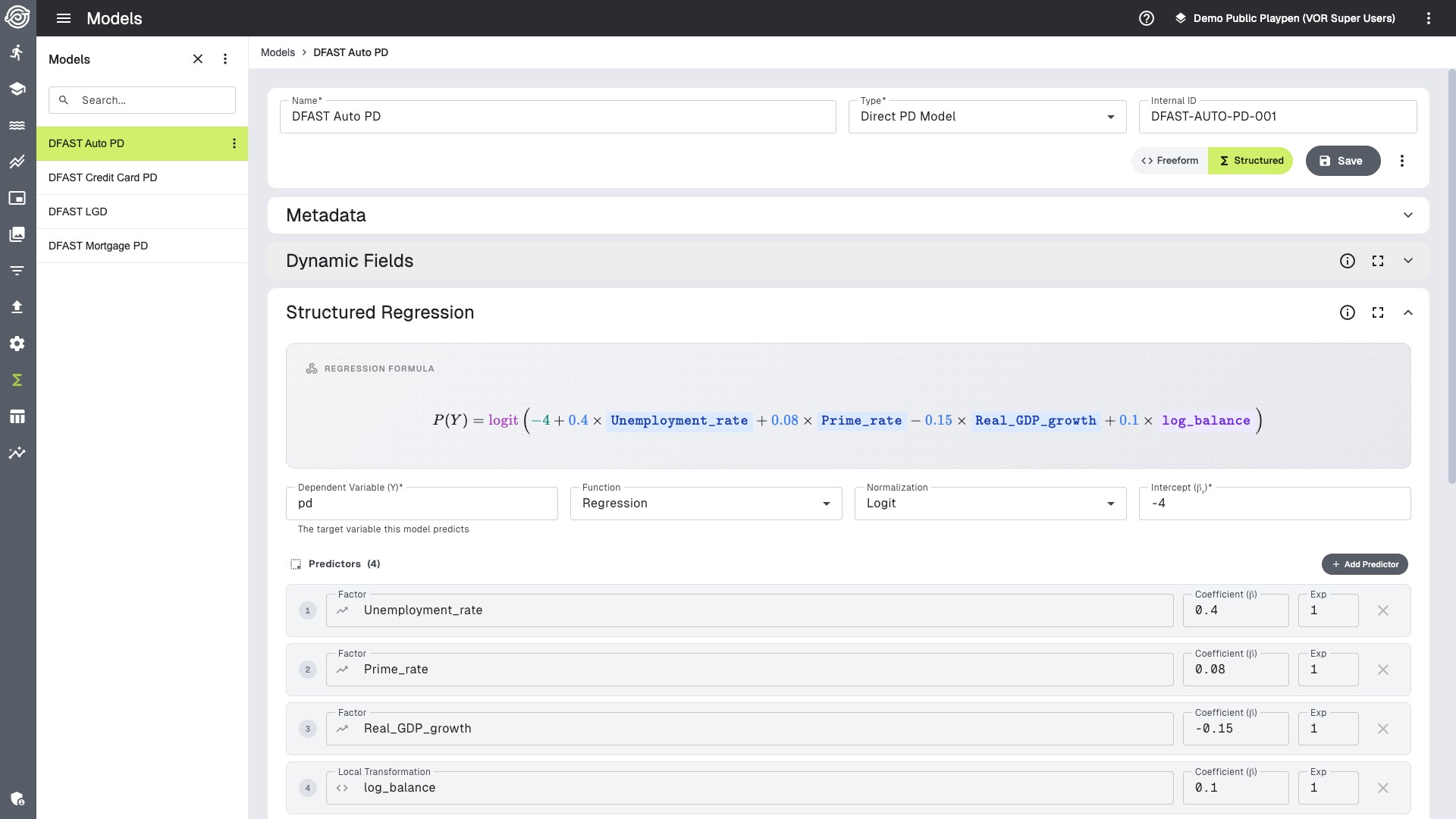
With Structured Model Definitions, you can define regression models entirely through the UI.
You can configure your dependent variable, select a normalization method (none, logit, or probit), add an intercept, and build out your predictors using a visual editor. Each predictor supports factor or dictionary references with configurable coefficients and exponents. A live formula preview renders the complete mathematical specification as you build.
For more complex models, the new Local Transformations capability lets you define computed fields using a formula editor with syntax highlighting, autocomplete, and a drag-and-drop factor palette. Formulas reference factors and dictionaries using {FieldName} syntax, and the system derives dependencies and detects circular references before you save.
When factors are renamed, dependent local transformation formulas update, so models remain editable as your factor library evolves. Structured model imports also validate predictor exponents up front and return clear feedback.
Lookup Predictors round out the structured model toolkit by enabling categorical factor mapping—for example, routing observations to different regional House Price Index factors based on a province code column.
Once defined, structured models compile and execute. There is no code generation step to manage. The engine evaluates linear models, computes link transformations, and handles expression evaluation.
Getting Started
Risk Factor Transformations
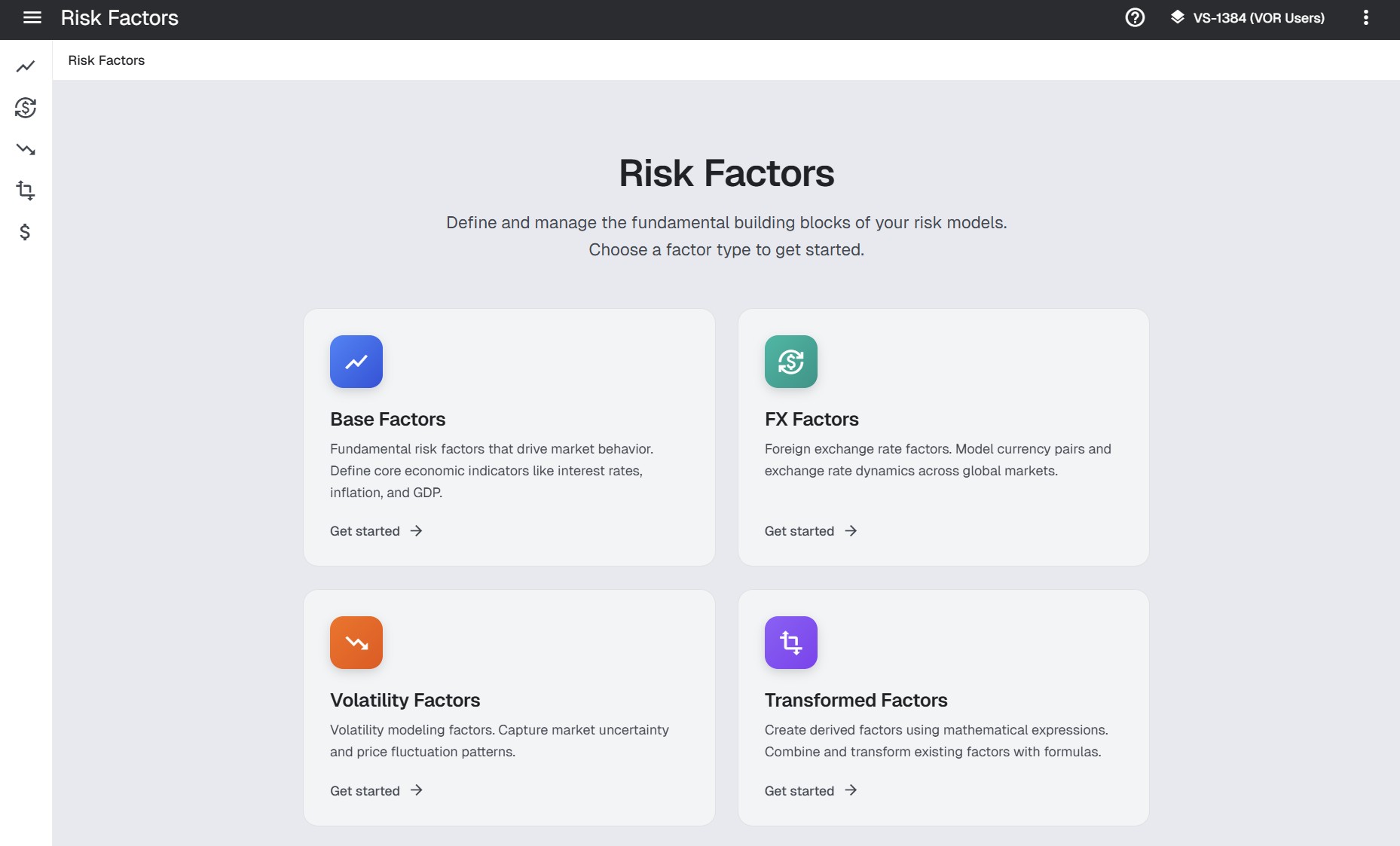
A new dedicated Transformations section in the UI provides full lifecycle management for all factor types: base factors, FX rates, volatility factors, and transformed factors.
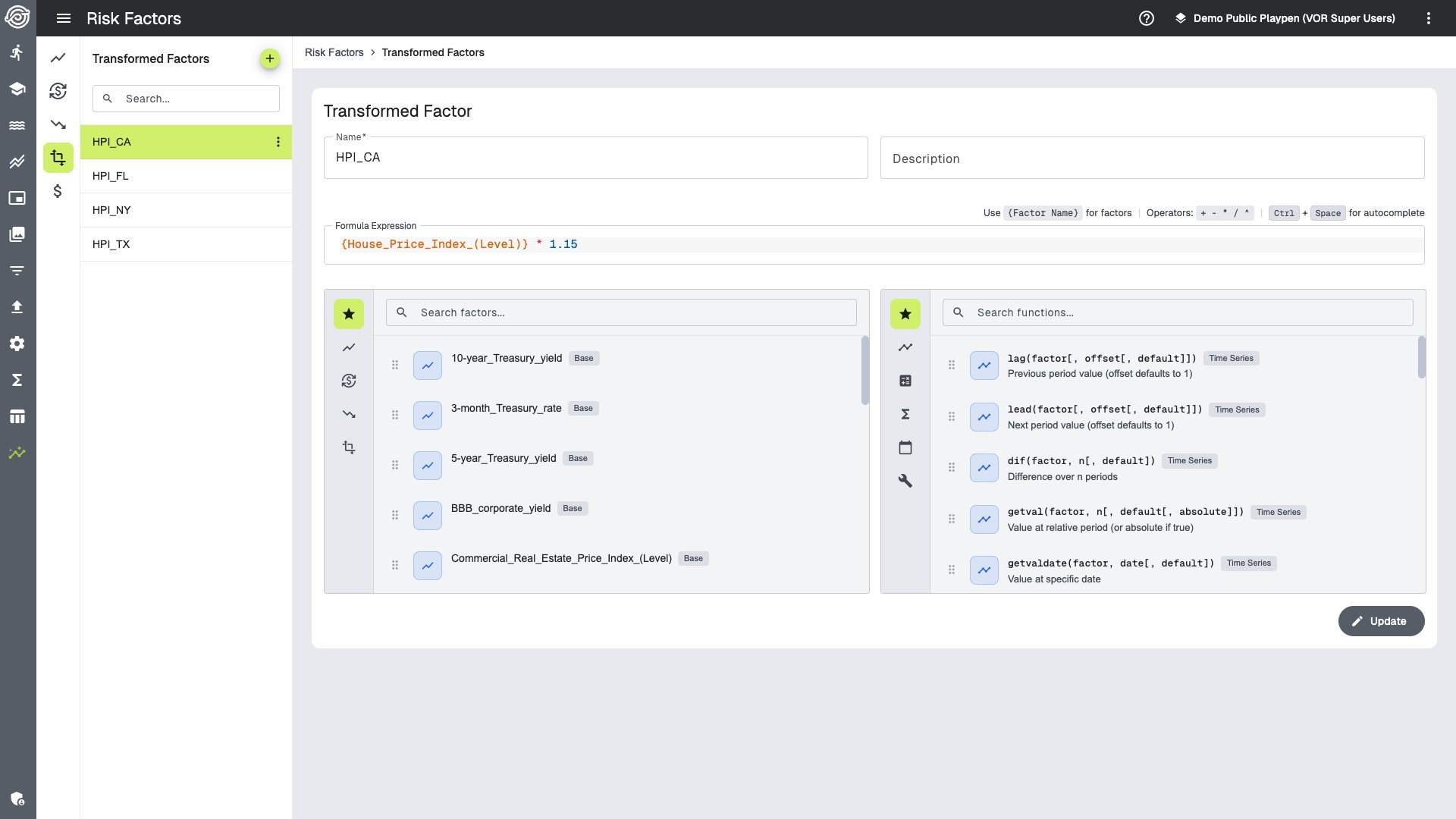
The Transformed Factors page features a CodeMirror-powered formula editor where you can define mathematical expressions using built-in functions like lag(), EMA(), and SMA(). The editor provides autocomplete for function names and factor references, plus a visual factor palette for drag-and-drop insertion.
On the CLI side, vor create factors --file factors.yaml supports bulk creation with dependency ordering (base factors first, then FX, volatility, and transformed). The vor delete factors command performs transitive dependency analysis and prompts for confirmation before removing factors that other transformations depend on.
During model execution, transformed risk factors are computed and added to scenario data. When a Model node uses scenarios, variables with defined transformations are evaluated on the fly.
Getting Started
Automated Model Node
A new model node type bridges the gap between UI-defined models and data processing pipelines. Add a line to your stream file:
model (input)(output) modelname="My Model" scenario=true
The engine compiles the named model, applies scenarios to input data, and routes any observations that cause model errors to a configurable exception queue. For framework-based segmentation, use type= instead of model_name= to let the framework’s filters route observations to the correct model.
Getting Started
Native Excel Integration
Working with control tables, reference data, and configuration is simpler. The Models screen includes a spreadsheet editor where you can edit Excel workbooks directly in the browser, with auto-save on cell commit and support for CSV, JSON, and XLSX imports.
The Configuration screen has been similarly upgraded—configurations are stored as Excel files, preserving formatting and multi-sheet layouts from desktop Excel. Legacy JSON format is still accepted for backward compatibility.
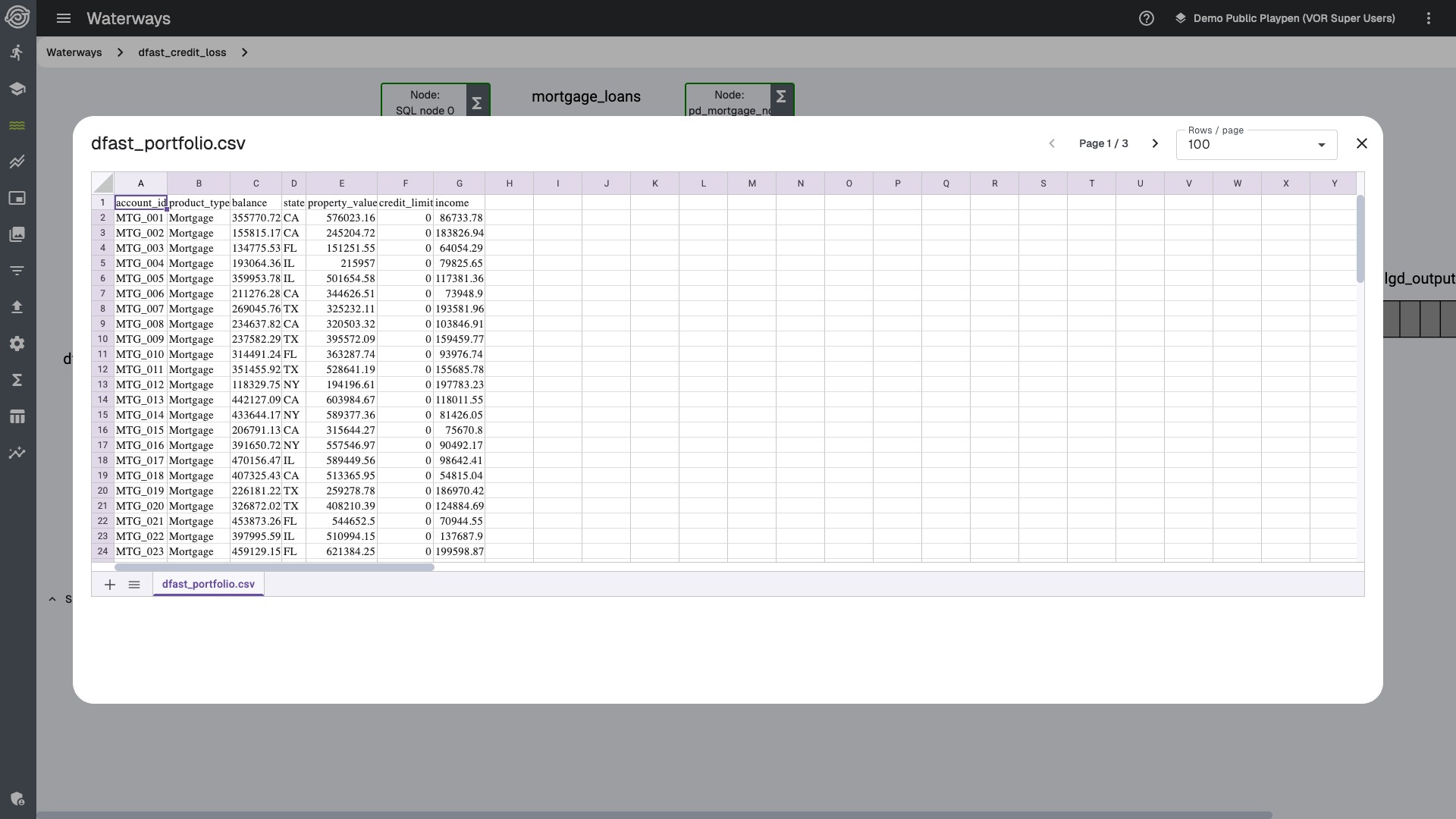
On the Waterways screen, you can preview output files inline with pagination, eliminating the need to download files for quick inspection.
AI-Powered Log Analysis
The “Explain Logs” feature sends run logs to a configured AI provider and returns a short explanation of what went wrong. It requires an administrator to enable AI services. The system gives extra weight to error and warning messages.
Supported providers include AWS Bedrock, Azure AI, and Ollama for on-premises deployments. Prompt templates are configurable through deployment settings.
Getting Started
Breaking Changes
Action Required
Study Datepicker Values
Datepicker values in study options have been converted from timezone-aware timestamps to date-only strings (e.g., 2025-08-04 instead of 2025-08-03T16:00:00.000Z). This fixes an issue where dates could shift by a day depending on the user’s timezone. Update any external tools or SDK scripts that parse these dates.
gRPC API Changes
Several gRPC services and RPCs have changed:
HistoryServicehas been removed entirely.GetConfigGroupOutputnow returns Excel binary data instead of a JSON string.
If you use the Go SDK, recompile all custom models and SDK consumers. For other gRPC clients, regenerate protobuf stubs.
Additional Input Queue Variables in Go Nodes
Additional input queue variables in generated Go node code are no longer accessible as bare package-level names. Access them through the User struct instead and regenerate node code with vor create process after upgrading.
// Before v26.1.0: bare package-level variable
func (u *User) _init() {
    for _, row := range my_config_table {
        u.lookup[row.Id] = true
    }
}

// v26.1.0 and later: access through the User struct
func (u *User) _init() {
    for _, row := range u.my_config_table {
        u.lookup[row.Id] = true
    }
}
Dynamic Facts in Custom Go Nodes
Dynamic facts exchanged between Go nodes now preserve their original Go types instead of always behaving like JSON-shaped values, and DynFactGet() now reports type mismatches explicitly. If you maintain custom Go nodes, review any DynFactGet() calls and any type assertions that assumed numeric facts would always arrive as float64. The updated Go node documentation shows both direct and typed access patterns.
Typed destination (new in v26.1.0):
The u.DynFactGet method now accepts an optional typed destination pointer. When provided, the value is decoded directly into the target type:
// Simple usage (unchanged)
val := u.DynFactGet("periods")

// New: decode directly into a typed variable
var periods float64
u.DynFactGet("periods", &periods)
Numeric type preservation:
Previously, setting an integer dynamic fact in one Go node would deliver it as float64 to downstream nodes (because values round-tripped through JSON). Now the original Go type is preserved:
// A producer node sets an int value:
runInfo["periods"] = 12
u.DynFactSet("periods", runInfo["periods"])

// Before v26.1.0: consumers received float64(12), type assertions on float64 worked.
// v26.1.0 and later: consumers receive int(12), float64 assertions will panic.

// Fix: explicitly send as float64 in the producer node
runInfo["periods"] = float64(12)
u.DynFactSet("periods", runInfo["periods"])
Database Schema Changes
Factor models have been migrated to a new factors Django app, and the attribution app has been removed.
Stability & Quality Improvements
This release includes quality improvements across the platform, with a strong focus on engine reliability, data integrity, and UI polish.
Engine reliability has been strengthened. Multi-threaded Python node execution is more stable, concurrent job processing is steadier, and database write failures surface with clearer errors. Process validation also catches cyclic subprocess references earlier.
Data integrity safeguards have been enhanced. Queue error handling ensures that any interruption is surfaced immediately with a clear message, and database write operations provide more detailed diagnostics including specific column names when issues arise. Playpen isolation has also been tightened to ensure strict workspace boundaries.
SQL engine improvements include support for min/max aggregates on datetime columns and CASE expressions with float types, expanding the range of transformations you can express directly in SQL nodes.
UI and workflow improvements span the entire application. Playpen switching fully refreshes all application state. Custom theme colors apply across all Material Design components. The code editor has been upgraded for better syntax highlighting. Reports are auto-selected and opened on job completion. Canceled jobs display their status. Visual refinements improve tooltip behavior, filter displays, fullscreen panel layouts, and overall consistency across light and dark themes. Additional polish improves Waterways rerun previews, skipped-output rendering, predictor dropdown alignment, and model-import responsiveness after file uploads.
Deployment reliability has been improved with better Ansible 12 compatibility and proper handling of special characters in credentials.
Administration & Deployment
Administrators will find several new tools in this release:
Administrators will find several new tools:
- Offline installation support for air-gapped environments with bundled Ansible packages
- Automatic playpen upgrades on service startup (configurable via
super-playpen-upgrade-enabled) vor troubleshootcommand for gathering diagnostic logs into a support archive- Django Administration accessible directly from the UI navigation
- Non-interactive secret creation via
vor create secret --cifor automation - py-spy profiling for Python nodes including subprocesses and C++ libraries
Major infrastructure upgrades include Go 1.26.1, RabbitMQ 4.2, Angular 21, and Django 5.2.12 with additional security updates across the stack.