
VOR Stream 2026.1.1 is the first patch release on the v2026.1 line and focuses on what comes after a big launch: closing the loop on the edge cases that surface as customers exercise new features in production. Upgrades from v2025.x are dramatically faster against large datasets, the new Risk Factor and Structured Model workflows shipped in v2026.1.0 have been hardened against several reported edge cases, administrators can now manage custom upload type permissions through a self-service UI, and a broad sweep of customer-reported security findings against the v2026.1.0 package has been addressed. There are no breaking changes; v2026.1.1 is a drop-in upgrade.
Highlights
Faster upgrades from v2025.x
A customer reported that the “Apply Django Migrations” step took several hours when upgrading from v2025.x to v2026.1.0 against a large dataset. The cause was three data migrations using per-row .create() and .save() calls instead of bulk operations. With hundreds of thousands of factor and scenario rows, that translates to thousands of individual SQL round-trips.
In v2026.1.1 those migrations have been rewritten around bulk_create and bulk_update. The benchmark below ran the same migration against identical synthetic datasets on a Docker MSSQL backend, and verified the output was byte-identical via SHA-256 checksum:
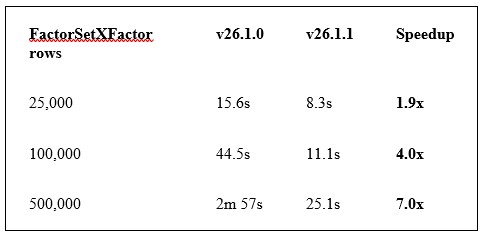
The speedup is non-linear because bulk operations amortize per-row overhead. At production scale (millions of rows), expect 10x or better. Customers who have already upgraded to v2026.1.0 are unaffected; Django simply skips migrations that have already run. Customers still on v2025.x can upgrade directly to v2026.1.1 and benefit from the faster path.
Who Benefits
This optimization helps anyone who has not yet upgraded from v25.x. If your migration window has been a concern, this release should materially shrink it.
Self-service custom upload type permissions
Creating custom upload type permissions in v2026.1.0 required dropping into manage.py shell or running raw SQL. That worked for engineering support but was painful for site administrators trying to onboard a new upload type for their team.
V2026.1.1 registers the Permission and UploadType models in Django Admin so administrators can do the whole thing through the browser: search and create permissions, link them to upload types using autocomplete, and assign them to groups. The Upload Types page in the VOR Stream Admin Guide has been rewritten around the new UI workflow and replaces the old REST API recipe.
Getting Started
Log in as a staff user, open the Administration screen, and you will find Permissions and Upload types in the Django Admin sidebar. The full workflow is documented on the Upload Types page in the Administration section of the VOR Stream Admin Guide.
Risk Factor and Structured Model Hardening
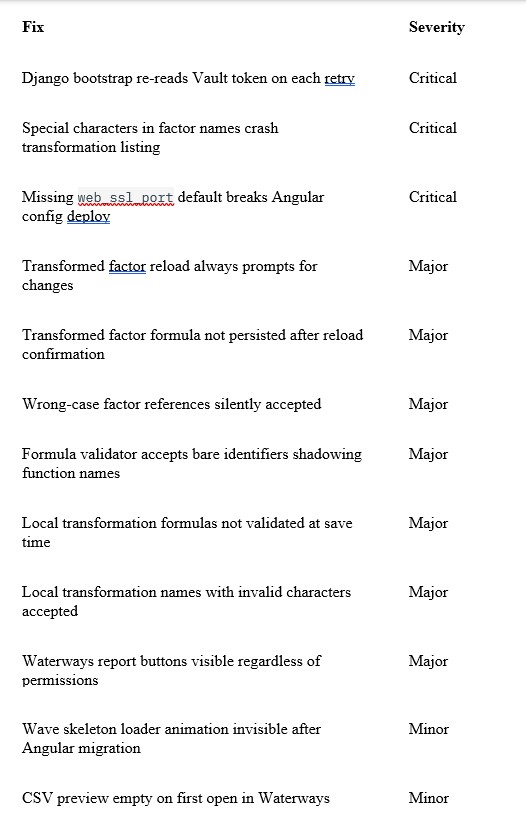
The Risk Factor Transformations and Structured Model features that shipped in v2026.1.0 saw heavy real-world use in March, and a series of edge cases surfaced as customers exercised the API and CLI paths outside the UI. v26.1.1 closes eight of them:
- Special characters in factor names crashed the API. Names containing
{,},!,:,., or[could pass through the formula rename cascade and reach the database, where they then crashed the entire factor transformation listing endpoint via an unhandled error in Python’s string formatter. The characters are now blocked at create and rename time, and the listing endpoint defends against any pre-existing bad data. - Orphan transformation rows. Creating an Expression transformation with an unknown factor reference returned a validation error, but the database row had already been written before the validation ran. This left null transformed factors that broke model process runs. The validation now happens before any write, inside an atomic transaction.
- Wrong-case factor references silently accepted. Writing
{interest}when the factor is namedInterestwas accepted via the API and CLI but failed at scenario execution. The formula is now auto-corrected to canonical casing on save, matching the behavior the UI already enforced. - Bare identifiers shadowing function names. A formula like
lag(lag, 1)was silently accepted because the validator skipped any identifier whose name matched a registered function, even when used as an argument. These factors producedNaNat runtime instead of being flagged. - CLI reload prompts that never cleared. Reloading a transformed factor from a YAML export always prompted for changes (a false positive on
dependent_factors), and after confirmation the formula was never actually persisted on the server. Both bugs are now fixed: reloads are idempotent and formulas round-trip correctly. - Local transformation validation gaps. Local transformation formulas in structured models were not validated at save time, and identifier-style names with dashes or leading digits were accepted by the API but produced a broken editing experience in the UI. Both checks now match the rules the Angular client enforces client-side.
If you experienced any of these in production, the fixes are in v2026.1.1 with no migration steps required.
Documentation
For the full Risk Factor workflow, see the Risk Factor Transformations guide. For Structured Models, see the Structured Models guide.
UI Fixes from the Angular 21 Migration
A few visual regressions slipped through the v2026.1.0 Angular 18 to 21 migration and have been corrected:
- The wave skeleton loader animation was invisible across the product. The mixin has been rewritten to use CSS
mask-imageinstead of compile-time SVG fill interpolation, with tuned contrast for both light and dark themes. - The Run Reports and Report History buttons on the Waterways screen were visible to all users regardless of permission. They are now correctly gated behind the report run permissions, matching the rest of the product.
- CSV previews opened from Waterways sometimes rendered an empty sheet on first open and required a manual page change to load. This happened when file metadata reported zero rows even though the preview endpoint returned data. The pagination initialization now falls back to the row count from the initial preview response.
Stability and Operations
A handful of critical operational fixes also landed in this release:
- Django no longer crashes permanently when its Vault token becomes stale (after a Vault restart, lease expiration, or seal/unseal). The bootstrap loop now re-reads the token file on every retry, so Django recovers automatically once Vault Agent writes a fresh token.
- A regression in v2026.1.0 caused fresh deployments to silently skip all Django fixture loading (including sample groups). Fresh deploys now seed fixtures correctly.
- A missing default for
web_ssl_portcaused deploys to fail during the Angular configuration step for inventories that did not set the variable explicitly. The default is restored.
Bug Fix Summary
Security
A customer-run security scan against the v2026.1.0 install package surfaced a set of findings, the bulk of which have been addressed in this release. Highlights of the remediation work:
- Hardcoded sample credentials (placeholders, never live secrets) have been cleared from the packaged
hosts.inito satisfy static scanners. - Dev-only Dockerfiles have been excluded from the install payload.
- The shipped PostgreSQL has been bumped from 14.15 to 14.22.
- Caddy, Consul, RabbitMQ, Erlang, and
go-sqlcmdhave been refreshed to current releases. - Go and Python dependencies have been upgraded to remediated versions across the board.
Beyond the scan remediation, this release migrates from the deprecated docker/docker Go module to the newer moby/moby split modules to address two Moby vulnerabilities that have no fix available in the older module. CVE patches were also applied to go-jose, grpc, requests, pygments, authlib, lodash-es, flatted, deepdiff, and memray.
Upgrade Notes
Drop-in upgrade
V2026.1.1 has no breaking changes and no required migration steps. Deploy it as you would any patch release.
If you are still on v2025.x, upgrade directly to v2026.1.1 to benefit from the data migration speedups. Customers who already upgraded to v2026.1.0 are unaffected by that change. Django skips migrations that have already run.